

Planning your dream cooking space has transformed dramatically in recent years. Gone are the days of hand-drawn sketches and guesswork. Modern digital tools now make creating your perfect room layout simpler than ever.
Homebase provides an impressive 3D planning service that lets you visualise every aspect of your new kitchen. Their sophisticated planner includes realistic cabinet finishes, flooring choices, and wall colours. You can experiment with different layouts and see how various products fit your space.
The system even tracks pricing as you select different options. This innovative approach helps avoid costly mistakes and brings your ideas to life before making any commitments. It’s a fantastic way to explore inspiration and create plans that truly work for your home.
Key Takeaways
- Homebase offers a comprehensive digital planning service for kitchens
- Their 3D tool allows visualisation of layouts, colours and finishes
- The system includes pricing features to track costs
- Users can experiment with different furniture and appliance options
- Digital tools help prevent expensive mistakes during renovation
- The service provides inspiration for creating your dream space
- Accurate measurements and dimensions can be incorporated into plans
An Introduction to Free Online Kitchen Design Tools
Gone are the days of graph paper and guesswork. The digital revolution has transformed how we plan our living spaces. Modern homeowners now have powerful tools at their fingertips.
These innovative programmes make creating your perfect room simpler than ever. They guide you through every step of the process. You gain complete control over your project’s vision.
The best platforms feature intuitive drag-and-drop interfaces. You can experiment with different layouts and configurations. Visualising your dream space becomes an enjoyable experience rather than a chore.
You Might Also Like:



These tools offer remarkable flexibility for planning. You can mix products from various retailers in your plans. This freedom helps create a truly personalised space that reflects your style.
“Digital planning tools have democratised interior design, putting professional-grade capabilities into the hands of every homeowner.”
Key benefits include realistic 3D visualisation and integrated pricing features. You can see exactly how your choices will look and cost. This helps avoid expensive mistakes before committing to purchases.
Most platforms require no obligation to buy from their associated retailers. They serve as valuable sources of inspiration and practical planning aids. Many people use them purely for ideas before consulting professionals.
The evolution from traditional methods to digital solutions represents a significant leap forward. These tools have become essential for modern renovation projects. They bridge the gap between imagination and reality.
Whether starting from scratch or adapting pre-set ideas, these programmes cater to all skill levels. They accommodate precise measurements and structural features like windows and doors. The result is a comprehensive plan that brings your vision to life.
As we explore specific offerings in subsequent sections, remember the broader context. These innovations have reshaped how we approach interior projects. They represent the new standard in home planning technology.
Does Homebase Do a Free Kitchen Computer Design?
Many homeowners wonder about digital planning services when renovating their cooking space. The answer is straightforward: yes, Homebase provides a complimentary computer-based design service. This generous offering helps visualise your ideal room before any purchases.
Their comprehensive platform includes a sophisticated 3D planner accessible through their website. Users can experiment with different layouts and configurations effortlessly. The system covers everything from cabinet arrangements to appliance placement.
You’ll find an impressive selection of styles and finishes available. Choose from various worktop materials, cabinet colours, and flooring options. The tool even includes realistic textures and lighting effects.
One standout feature is the integrated pricing calculator. As you add products to your virtual space, the system tracks costs in real-time. This transparency helps maintain your budget throughout the planning process.
The service extends beyond digital tools to include professional support. After creating your initial plans, you can book a complimentary consultation with an expert designer. They’ll review your ideas and suggest improvements.
This holistic approach ensures your final plan meets both aesthetic and practical needs. Whether starting from scratch or adapting existing concepts, the platform accommodates all skill levels.
Compared to paid services from other providers, Homebase’s offering holds its own remarkably well. Many premium features appear in their free version, making it exceptional value. The only difference is the absence of obligation to purchase their products.
Accessibility remains another strong advantage. The online platform works on most devices without special software. You can save projects and return to them later, making planning convenient around your schedule.
| Feature | Homebase Free Service | Typical Paid Services |
|---|---|---|
| 3D Planning Tools | ✓ Full access | ✓ Usually included |
| Product Selection | ✓ Extensive range | ✓ Varies by provider |
| Pricing Integration | ✓ Real-time costing | ✓ Sometimes available |
| Professional Consultation | ✓ Complimentary option | ✓ Often extra cost |
| Purchase Obligation | ✗ None required | ✓ Sometimes expected |
For those seeking additional inspiration, the Homebase Kitchen Planning Tool provides template ideas to spark creativity. These pre-designed layouts help users visualise potential configurations quickly.
The entire process focuses on making kitchen renovation less daunting. By offering professional-grade tools without cost, Homebase demonstrates commitment to customer satisfaction. It’s an excellent way to transform your cooking space with confidence.
What’s Included in the Homebase 3D Kitchen Planner?
Creating your ideal cooking area becomes remarkably straightforward with comprehensive digital assistance. The platform offers everything needed to transform vague concepts into detailed visualisations.
You’ll discover an impressive array of features that cater to both practical needs and creative aspirations. The system guides you through each decision while maintaining complete flexibility.

Extensive Product and Style Selection
The virtual showroom presents an enormous variety of finishes and materials. Choose from contemporary handleless cabinets or traditional shaker styles with various wood effects.
Worktop options include quartz, granite, laminate, and solid surface materials. Each selection displays realistic textures and lighting responses within your virtual space.
Wall colours and flooring choices span hundreds of contemporary and classic shades. Mix and match splashback patterns with different tile arrangements effortlessly.
- Over 50 cabinet finishes and door styles available
- Comprehensive appliance selection from leading brands
- Multiple worktop materials with accurate visual representation
- Wide range of flooring and wall covering options
- Various handle and fitting choices to complete your look
Precise Room and Layout Customisation
Begin by inputting your room’s exact dimensions for accurate planning. The system accommodates unusual shapes and architectural features seamlessly.
Adjust wall positions and angles to match your actual space perfectly. Incorporate structural elements like windows, doors, and architectural details with precision.
Experiment with different configurations using intuitive drag-and-drop functionality. Test various work triangle arrangements between cooking, cleaning, and storage areas.
Integrated Pricing and Budgeting Tool
The smart costing feature updates automatically as you modify your selections. See immediate price changes when switching materials or adding extra units.
This real-time financial tracking helps maintain control over your project budget. Compare different options while understanding their financial implications clearly.
Export detailed cost breakdowns for discussion with family members or professional fitters. The transparency ensures no unexpected expenses arise during your project.
“Seeing the immediate cost impact of design changes revolutionises budget management. It transforms wishlist items into practical financial decisions.”
The platform’s user-friendly interface makes navigation simple for all experience levels. Context-sensitive help options provide guidance whenever needed during the creation process.
Your final plan becomes a comprehensive blueprint showing exactly how your dream space will look and function. This detailed visualisation bridges imagination and reality beautifully.
How the Homebase Kitchen Design Tool Works: A Step-by-Step Guide
Embarking on your renovation journey becomes incredibly straightforward with intuitive digital assistance. The platform guides you through each phase with clear instructions and helpful prompts.
You can access comprehensive support throughout your creative process. A dedicated help button provides instant guidance whenever questions arise.
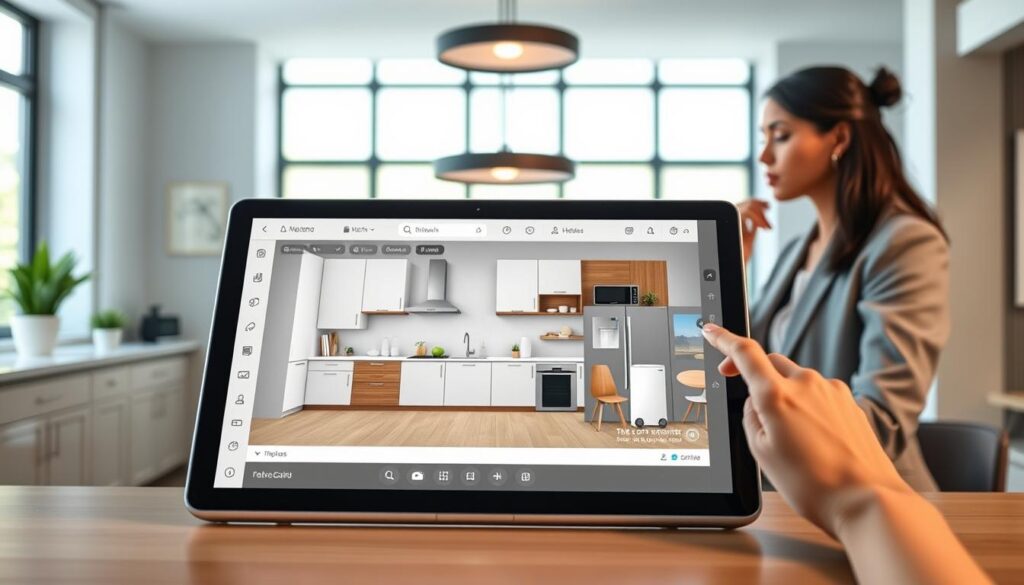
This innovative system combines professional features with user-friendly operation. It transforms complex planning into an enjoyable creative experience.
Starting Your Project: Blank Canvas or Pre-Set Ideas
Begin by choosing your preferred approach to creating your ideal space. The platform offers complete flexibility based on your confidence level.
Select a blank canvas to build everything from scratch. This option suits those with specific visions or unusual room shapes.
Alternatively, browse pre-designed templates for instant inspiration. These ready-made layouts showcase popular configurations and style combinations.
- Blank canvas option for complete creative freedom
- Pre-set templates for quick starting points
- Ability to modify any template to suit your preferences
- Option to save multiple versions for comparison
Drawing Your Floor Plan and Adding Structural Features
Input your room’s precise measurements using the intuitive scale tools. The system converts these figures into an accurate digital representation.
Add architectural elements like windows, doors, and structural supports. These features ensure your plan reflects reality perfectly.
Mark permanent fixtures and service points for practical planning. Note plumbing locations, electrical outlets, and ventilation requirements.
“Accurate measurements form the foundation of any successful renovation. Taking time here prevents issues later.”
Drag-and-Drop Design: Selecting Cabinets and Appliances
Browse the extensive product catalogue featuring various styles and finishes. Filter options by colour, material, or functional requirements.
Use simple drag-and-drop functionality to position units within your space. The system automatically snaps items into alignment for professional results.
Experiment with different configurations and workflow arrangements. Test various layouts to find the most efficient solution for your needs.
| Design Element | Selection Options | Customisation Features |
|---|---|---|
| Storage Units | Base cabinets, wall units, tall larders | Adjustable shelving, internal organisers |
| Work Surfaces | Quartz, granite, laminate, wood | Edge profiles, thickness options |
| Appliances | Integrated, freestanding, built-in | Finish choices, capacity variations |
| Finishing Touches | Handles, taps, lighting, splashbacks | Material selections, style coordination |
Visualising Your Choices in 3D and Photo-Realistic Modes
Switch between planning and viewing modes to see your creation come alive. The 3D perspective allows you to walk through your virtual space.
Examine sightlines and practical considerations from different angles. Check clearances and accessibility throughout the room.
Activate photo-realistic rendering for stunningly accurate visualisations. This feature shows materials, textures, and lighting effects with remarkable realism.
For additional guidance on complex installations, consult comprehensive kitchen fitting resources that cover technical aspects.
Save your favourite versions and share them with family members or professionals. The export function creates detailed plans and specification sheets.
This complete process ensures your final design meets both aesthetic aspirations and practical requirements perfectly.
Taking Your Design Further: The Free Homebase Design Consultation
Your digital creation comes to life through professional guidance. Homebase offers complimentary consultations to refine your virtual plans.
This service bridges the gap between imagination and reality. Experts review your ideas with practical installation experience.
Booking happens easily through their website or local store. You’ll discuss your vision with qualified specialists.
These sessions typically last about an hour. They focus on making your layout work perfectly.
“Professional input transforms good ideas into exceptional spaces. It’s the difference between theoretical planning and practical perfection.”
Designers verify your room’s measurements carefully. They ensure everything fits your actual space.
Expect suggestions about workflow optimisation. Specialists consider how you’ll use the area daily.
They might recommend adjusting cabinet arrangements. Sometimes moving appliances improves functionality.
Lighting and electrical planning often gets addressed. These elements dramatically affect usability.
Material selections receive professional evaluation. Experts know which finishes withstand daily use.
Budget considerations remain part of the conversation. The adviser helps balance dreams with practicality.
Preparation makes your consultation more valuable. Bring your digital plans and room dimensions.
Have inspiration images ready to share. Consider your household’s specific needs beforehand.
Think about storage requirements and cooking habits. These details help create your perfect space.
| Consultation Element | What It Covers | Potential Benefits |
|---|---|---|
| Space Planning | Layout optimisation and traffic flow | Improved functionality and safety |
| Material Advice | Durability and maintenance guidance | Long-term satisfaction with choices |
| Technical Considerations | Plumbing, electrical, and ventilation | Avoiding installation problems |
| Budget Management | Cost-effective alternative suggestions | Staying within financial limits |
| Style Coordination | Colour schemes and finish matching | Cohesive aesthetic appearance |
Many homeowners discover new possibilities during these sessions. Professional eyes spot opportunities you might miss.
They might suggest better appliance positioning. Sometimes a different configuration enhances natural light.
Storage solutions often receive creative improvements. Experts know clever ways to maximise every centimetre.
These consultations address practical installation issues. They consider plumbing access and electrical requirements.
You’ll receive advice about professional fitting services. The discussion covers what to expect during installation.
This service mirrors the excellent approach seen in professional design studios. It brings showroom expertise into your planning process.
Remember to ask about product lead times. Some items might require longer delivery periods.
The adviser can explain warranty details too. Understanding protection gives peace of mind.
Ultimately, this consultation ensures your dream space becomes reality. It’s the perfect finishing touch to your planning journey.
Other Free Kitchen Design Tools to Consider
Exploring different digital planners helps you find the perfect match for your project needs. Each platform offers unique strengths that suit various planning approaches.
Some focus on technical precision while others excel at visual styling. Understanding these differences ensures you select the right tool for your vision.
Many homeowners use multiple planners during their creative process. Combining various features often yields the most comprehensive results.
IKEA Kitchen Planner: For Detailed Customisation
This popular system stands out for its remarkable attention to technical details. It accommodates complex elements like pipework and electrical sockets effortlessly.
The interface allows precise positioning of radiators and air vents. You gain complete control over every aspect of your room’s infrastructure.
Realistic 3D visualisation shows how products fit your actual space. The cost estimation feature updates automatically with each modification.
- Comprehensive technical customisation options
- Accurate pricing integration throughout planning
- Extensive product catalogue with realistic visuals
- Advanced measurement tools for perfect fitting
Wren Kitchens Online Planner: For Style Visualisation
This platform specialises in helping you create stunning aesthetic combinations. It focuses on colour coordination and material matching beautifully.
You can experiment with countless finish combinations effortlessly. The system showcases how different elements work together harmoniously.
Visualisation tools demonstrate lighting effects and texture interactions. It’s perfect for developing cohesive style schemes throughout your space.
“Seeing material combinations in realistic renders transforms decision-making. It builds confidence in your stylistic choices before commitment.”
Planner 5D: For Whole-Home Design Projects
This versatile tool extends beyond cooking areas to entire properties. It’s ideal for those planning comprehensive interior transformations.
The platform offers both 2D and 3D planning perspectives seamlessly. You can work across multiple rooms while maintaining consistent styling.
An enormous catalogue includes furniture and decorative items. Cost estimation covers complete projects rather than individual spaces.
| Platform | Primary Strength | Best For |
|---|---|---|
| IKEA Planner | Technical precision | Complex installations |
| Wren Kitchens | Aesthetic coordination | Style development |
| Planner 5D | Whole-property planning | Complete home projects |
Each tool serves different purposes within the planning journey. Technical projects benefit from IKEA’s detailed approach while style-focused plans suit Wren’s visual strengths.
Whole-home renovations demand Planner 5D’s comprehensive capabilities. Many users combine elements from various platforms for optimal results.
Remember that most platforms allow saving and exporting your creations. You can move between tools as your project evolves through different stages.
These complementary options ensure every homeowner finds their perfect planning partner. They represent the wonderful diversity available in modern digital design tools.
Conclusion
Transforming your cooking space becomes an exciting journey with modern digital assistance. These innovative tools offer comprehensive visualisation and planning capabilities without any commitment.
The comprehensive planner provides realistic 3D views of your ideal layout. You can experiment with various configurations and product combinations effortlessly.
Integrated costing features help maintain budget control throughout your project. Professional consultations further refine your ideas into practical solutions.
This approach ensures your final plan meets both aesthetic dreams and functional needs perfectly. It’s the ideal starting point for creating a space that truly works for your home.
FAQ
Does Homebase offer a free kitchen design service?
Yes, Homebase provides a complimentary kitchen design service both online and in-store. Their digital planner lets you experiment with layouts and products, while in-store consultations offer personalised advice.
What features are included in the Homebase 3D kitchen planner?
The planner includes an extensive product library, precise room customisation tools, and an integrated pricing feature. You can visualise your space in 3D and adjust colours, finishes, and measurements.
How user-friendly is the Homebase kitchen design tool?
It’s built for ease of use, with a drag-and-drop interface that helps you place cabinets, appliances, and furniture. You can start from scratch or use pre-set layouts for inspiration.
Can I see my design in 3D before making a decision?
Absolutely. The tool offers both 3D and photo-realistic viewing modes, so you can explore your kitchen from every angle and get a true feel for the space.
Is the online design tool completely free to use?
Yes, the Homebase kitchen planner is free to access and use online. There’s no charge for designing your dream kitchen and experimenting with different options.
What if I need help with my design or want professional input?
You can book a free design consultation in-store. A specialist will review your plans, offer suggestions, and help bring your ideas to life with expert advice.
Are there other free kitchen design tools available?
Yes, alternatives like the IKEA Kitchen Planner, Wren Kitchens visualiser, and Planner 5D offer different features. These can be useful for comparing styles or planning entire rooms.